MidClick
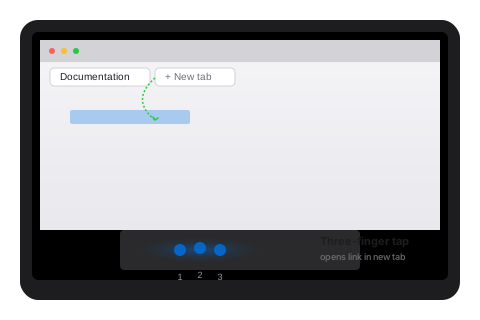
Three-finger tap = middle click.
That's the entire app.
Built for macOS 11 and later. Universal Binary for Intel and Apple Silicon. Runs in your menu bar with under 10MB of RAM. Free forever with daily limits, or unlock once for all your Macs.
The free version is the full app
Every feature works. Every setting works. The only thing that changes after upgrading is the daily 300-use cap. Most people never hit it. You can use the free version indefinitely.
Fetching latest version…
Universal Binary · macOS 11+ · No App Store required
Everything you need, nothing you don't
Focused on the core experience. Every feature earns its place.
What does a three-finger-tap middle-click app actually need to work well? Exactly six things, and nothing more: a reliable gesture detector, proven long-running stability, a tiny RAM footprint, strict local privacy, adjustable sensitivity, and one Universal Binary that runs on every Mac.

Three-finger tap = middle click
Tap with three fingers on your trackpad. MidClick sends a real middle-click to whatever app is focused.

Battle-tested reliability
Stays running for days on end. Survives sleep and wake cycles. No memory leaks, no crashes.

Under 10MB of RAM
Designed for old Intel iMacs. Sits quietly in your menu bar with effectively zero CPU usage.

Local-first privacy
Your gestures never leave your Mac. Anonymous fingerprint hashing for licensing. No tracking.

Adjustable sensitivity
Fine-tune how lightly the gesture responds, debounce timing, and per-app blacklists/whitelists.

Universal Binary
One download for both Intel and Apple Silicon Macs. No Rosetta translation needed.
Where it shines
The middle-click gesture is everywhere once you know where to look.
Where is a middle click most useful on a Mac? In a browser it opens links in new tabs; in a terminal it pastes the current selection; in design tools and IDEs it pans the canvas or jumps to definitions. Set up MidClick once, then three-finger-tap in any of these apps to perform the same action your old mouse's middle button did.
Browser
Open links in new tabs, close tabs, navigate back. Works in Safari, Chrome, Firefox, Arc.
Terminal
Paste selection in iTerm2, Terminal, and Warp with the same gesture you'd use on Windows.
Design & IDEs
Pan canvases in Figma, open definitions in VS Code, navigate files in Finder and Xcode.
Learn more about middle-clicking on Mac
Free guides on using a middle click without a mouse — built-in tricks and why MidClick is the most reliable option.
System requirements
MidClick runs on virtually any Mac released in the last decade. We support the oldest Intel iMacs as well as the latest Apple Silicon machines.
Common questions
Have more? See the full FAQ orcontact us.
What's new
Latest release notes for MidClick.
Free, forever. Pay only if you want unlimited.
The free version of MidClick is the full app — every feature, every setting, every detail. The only difference is a generous daily cap of 300 middle-clicks that most people never reach. Use it as long as you want. Upgrade only if you need unlimited usage across multiple Macs.
Fetching latest version…